
Transaction Decoding
The Transaction Decoder helps you verify and understand the details of transactions created by the Figment API before signing and broadcasting them. By decoding transaction data, you can confirm exactly what actions will be performed on-chain.
What is the Transaction Decoder?
When you create transactions using Figment's Staking API, the API returns encoded transaction data that needs to be signed before broadcasting to the blockchain. The Transaction Decoder translates this encoded data into the underlying instructions, allowing you to verify:
- The specific operations being performed
- Target addresses
- Token amounts being staked or unstaked
- Program/contract instructions being executed
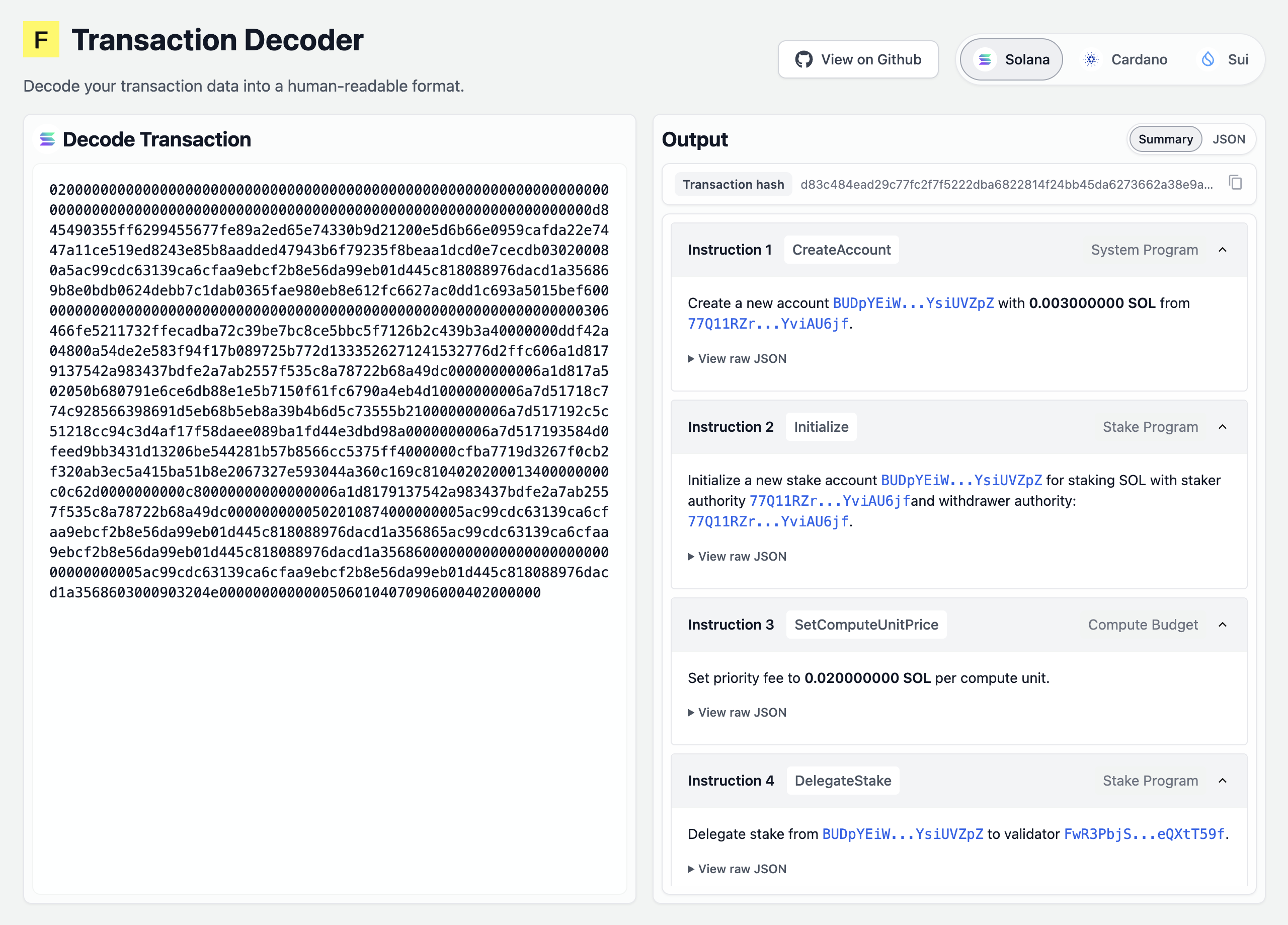
This verification step is crucial for security and compliance, especially when working with institutional custody solutions.
Network Support
The Transaction Decoder currently supports Solana, Cardano, Sui
Additional network support will be added based on customer needs.
Using the Web Interface
The easiest way to decode transactions is through the web interface at decoder.figment.io/solana.
Steps to Decode
-
Get your transaction data from the Figment API response. Look for fields like:
unsigned_tx_serialized_hex(Solana)unsigned_transaction_serialized(Cardano, Sui)
-
Paste the transaction data into the decoder interface
-
Review the decoded output which shows:
- Accounts involved
- Token amounts
- Program/contract instructions
- Transaction hash, to be verified against
signing_payload, which is what your private key actually signs
Integration with Your Workflow
The Transaction Decoder fits into your staking workflow at the verification stage:
- Create transaction → Call Figment API endpoint (e.g.,
POST /stake) - Decode transaction → Use Transaction Decoder to verify details
- Sign transaction → Use your custody solution (Fireblocks, etc.)
- Broadcast transaction → Submit signed transaction via Figment API
This verification step helps ensure that the transaction you're signing matches your intentions before committing funds on-chain.
Using the Decoder Programmatically
For automated workflows, you can integrate the decoder directly into your code. The decoder is open source and available at github.com/figment-networks/tx-decoder.
Local Development
# Clone the repository
git clone https://github.com/figment-networks/tx-decoder.git
cd tx-decoder

# Install dependencies
pnpm install

# Run locally
pnpm dev
When to Use the Decoder
TLDR - always! Specifically, you should decode transactions when:
- Setting up a new integration with Figment's API
- Implementing new staking operations in your application
- Auditing transactions for compliance or security reviews
- Troubleshooting unexpected transaction behavior
- Training team members on how staking transactions work
References
- Transaction Decoder Web UI
- Transaction Decoder GitHub Repository
- Signing Transactions Guide
- Solana API Overview
Need Help? If you have questions about decoding transactions or integrating the decoder into your workflow, reach out to the Figment team.
Updated 9 months ago